

Most Bluetooth controller problems on vehicle LED kits trace back to one of two causes: 2.4 GHz RF overlap or electrical noise from PWM-driven LED drivers. Start with the easy checks. Re-pair the controller, move your phone closer, and turn off nearby Wi-Fi hotspots or other Bluetooth devices. Confirm your app and firmware are current. If disconnects or flicker persist after that, the fix likely lives in your wiring and grounding, not your phone settings.
TL;DR:
- Interference caused by PWM-driven LED drivers typically results in flickering and audible noise that worsen with increased brightness, unlike RF interference which causes disconnects and lag.
- Bluetooth controller issues are often due to spectrum congestion from nearby Wi-Fi, hotspots, or other 2.4 GHz devices, and moving away from these sources can improve connection reliability.
- Proper wiring practices, including dedicated power feeds, single-point grounding, and incorporating filters or bulk capacitors, significantly reduce electrical noise and interference.
- Firmware and app updates can enhance Bluetooth stability by improving channel hopping and recovery methods, making regular updates an essential maintenance step.
- Mounting the controller with a clear line of sight and away from metal objects minimizes multipath reflection and physical blocking of the Bluetooth signal.
Table of Contents
- Is Your Bluetooth Controller Interference RF or Electrical?
- Why Do Bluetooth and LED Drivers Interfere With Each Other?
- How Do You Diagnose Bluetooth Controller Interference Step by Step?
- What Fixes Actually Stop Bluetooth Controller Interference?
- Installation Checklist for Avoiding Bluetooth Controller Interference
- When Should You Replace the Controller or Call a Pro?
- Do Physical Surroundings Affect Bluetooth Controller Signal Strength?
- Do Firmware and App Updates Reduce Controller Interference?
- How Does Bluetooth Avoid Interference on Its Own?
- How Should You Position Nearby Wireless Devices to Cut Interference?
- What Else Besides Wi-Fi Causes Bluetooth Interference?
- Wheel Light Express’s Take on Interference-Ready Installs
- Get a Wiring Setup Built to Avoid Interference From the Start
- Sources
- FAQ
Is Your Bluetooth Controller Interference RF or Electrical?
Before touching a single wire, figure out which camp your symptoms fall into. Connection problems and electrical noise have different fingerprints, and mixing up the two wastes hours chasing the wrong fix.
Signs pointing to RF/wireless interference:
- Random disconnects that don’t correlate with anything you’re doing to the lights
- Noticeable lag between tapping a pattern in the app and seeing it change
- The controller won’t pair at all, or takes several attempts
Signs pointing to electrical noise (PWM/EMI):
- Flicker that gets worse as brightness increases
- An audible whine or buzz through your stereo speakers that changes pitch with dimming
- Interference that shows up the instant the lights are powered on, regardless of Bluetooth range
The single best diagnostic rule of thumb: if the problem scales with brightness, it’s PWM and EMI, not Bluetooth. Before you start testing, jot down three things: how far you were from the controller, your phone model, and exactly when the issue started. That log turns guesswork into a real diagnosis.
Why Do Bluetooth and LED Drivers Interfere With Each Other?
Bluetooth lighting controllers communicate on the 2.4 GHz ISM band, the same crowded slice of spectrum used by home Wi-Fi routers, wireless earbuds, and plenty of aftermarket electronics. When several 2.4 GHz transmitters compete in the same physical space, packets collide, and the result is dropped connections, added latency, or a failure to pair at all. Park next to another rig running a Bluetooth-controlled stereo or a phone hotspot, and you’ve built exactly that kind of collision zone.
The electrical side works differently. High-density RGB LED drivers control brightness with pulse-width modulation, switching power on and off at a carrier frequency typically between 10 and 20 kHz. That rapid switching is efficient, but it draws sharp, repetitive current pulses from your 12V system. If the driver’s input bulk capacitance is too small to smooth those pulses, ripple shows up on the vehicle’s power bus, and that ripple is what causes flicker or the classic whine through an amplifier.
Wiring makes this worse or better depending on how it’s routed. A long, ungrounded power run acts like an antenna, radiating those switching pulses outward. A poor or shared ground path lets the noise conduct back into other electronics on the same circuit, including the Bluetooth module itself. This is why two identical LED kits, installed differently, can behave completely differently in the same truck.
How Do You Diagnose Bluetooth Controller Interference Step by Step?
Work through these in order. Each step narrows down the cause before you spend money on parts.
- Reboot and re-pair. Forget the device in your phone’s Bluetooth settings, restart the controller, and pair again. Check that the app has full Bluetooth and location permissions, and update both the app and controller firmware if a newer version exists.
- Isolate the RF environment. Turn off nearby Wi-Fi hotspots, disconnect other Bluetooth accessories, and test again standing right next to the vehicle. Then try the engine off and on, since some ignition systems add their own RF noise.
- Check power and ground. Watch whether flicker or whine tracks with brightness level. Inspect ground points for corrosion or a loose bolt, verify fuses, and confirm the harness isn’t routed alongside an alternator or ignition wire.
- Substitute and, if needed, measure. Swap in a spare controller or a different power tap if you have one. For a more precise read, a scope on the 12V feed should show ripple under roughly a small voltage ripple within a low millivolt range on a clean circuit.
Pro Tip: Photograph your wiring at each test stage and note the date, firmware version, and what changed. If you end up filing a warranty claim, that record is the difference between a quick replacement and a drawn-out back and forth.
What Fixes Actually Stop Bluetooth Controller Interference?
Some fixes take five minutes. Others mean redoing part of your harness. Start cheap, then escalate only if the problem sticks around.
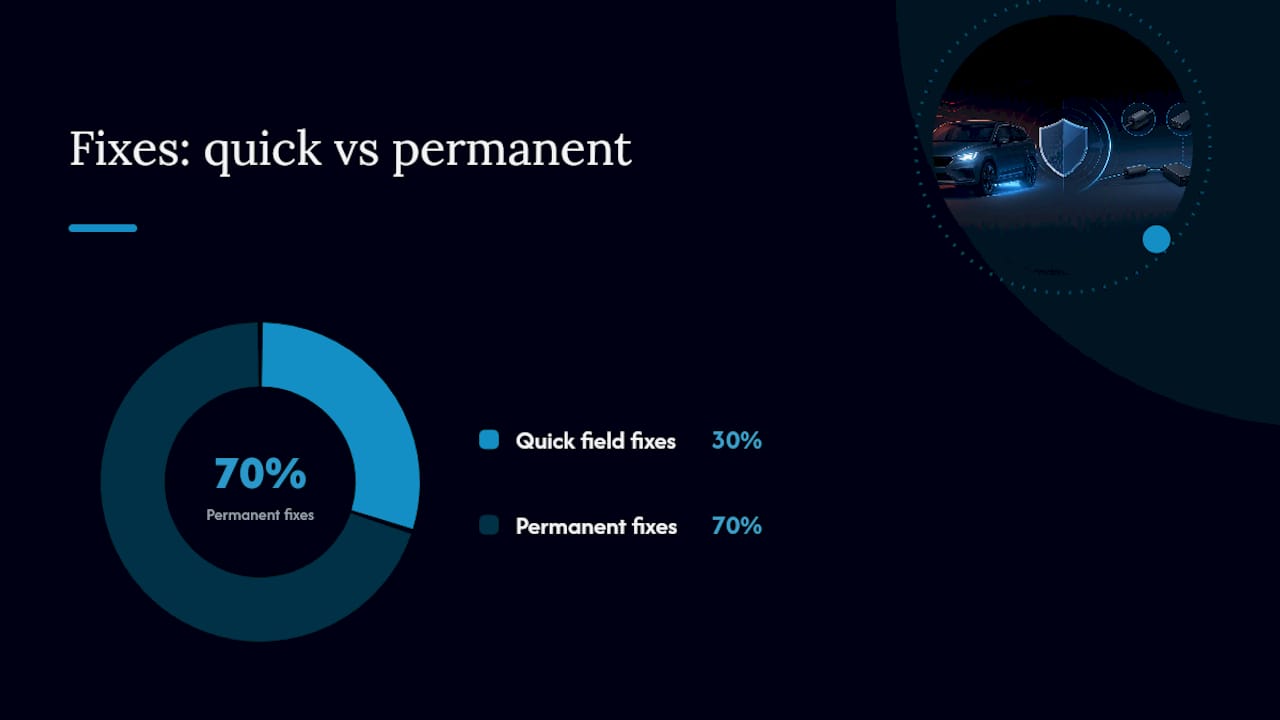
Quick field remedies:
- Re-pair the controller and move your phone within a few feet during the retest
- Clamp a ferrite bead around the power input near the controller
- Relocate your phone or the controller itself away from other RF sources on the dash
Permanent installation fixes:
- Run a dedicated fused +12V feed instead of tapping an existing circuit
- Add a bulk capacitor right at the driver’s power input
- Install filters or common-mode chokes on the power leads to reduce interference
- Bond everything to a single ground point at the battery negative terminal
- Route power and signal wires as twisted pairs, clear of audio cables
Ferrite clamps genuinely work as a stopgap. Wrapping the cable through the ferrite core, rather than just clamping it once, meaningfully increases the attenuation, and other installer guides back up placing coils as close to the driver as possible for the best effect. But a ferrite is a patch on a symptom, not a cure for the root cause. Components carrying recognized EMC certifications such as CISPR 25 or ECE R10 certification have already been tested against these emission limits at the design stage, which is why certified kits tend to need far fewer of these after-the-fact fixes. The combination of bulk capacitor, LC filter, choke, and single-point grounding is the sequence that reliably eliminates PWM-driven whine in 12V vehicle installs, not any single component alone.
Pro Tip: Loop the power wire through a ferrite choke three or four times instead of once. Each additional pass through the core roughly multiplies the noise suppression, and it costs you nothing but a few extra minutes.
Installation Checklist for Avoiding Bluetooth Controller Interference
Get the install right the first time and you’ll skip most of the troubleshooting above entirely.
- Wire a dedicated fused power feed straight from the battery or a clean accessory circuit, never a shared tap.
- Keep ground runs short and bond every ground to a single point at the battery negative terminal.
- Twist power and return leads together and keep them away from audio or speaker cables.
- Mount the controller and its antenna clear of metal panels or brackets that can block the signal.
- Choose components with recognized EMC certifications such as CISPR 25 or ECE R10 emission testing behind them whenever that information is available.
- Note the firmware and app version at install time so you have a baseline if something changes later.
A proper wire harness and secure fused connection points do more to prevent interference than any after-market filter added later. If you’re still deciding how the controller fits into your overall setup, our breakdown of how vehicle LED lighting controllers work covers the basics before you start running wire.
When Should You Replace the Controller or Call a Pro?
If you’ve re-paired, isolated the RF environment, cleaned every ground, and added filtering, and the symptoms haven’t budged, the controller or driver itself is probably defective. That’s a hardware failure, not a wiring problem, and no amount of ferrite wrapping fixes a bad component.
Before filing a warranty claim, gather what you tested: the steps you ran, photos of your wiring, and the firmware version installed at the time. A specific record moves a claim along faster than “it just doesn’t work right.”
If your harness runs through tight spaces near the frame, or you’re not confident probing the 12V bus with a scope, bring in a professional installer or an automotive electrical specialist. Some grounding issues hide inside factory harness connectors that aren’t obvious until someone’s hands are actually in the wiring.
Do Physical Surroundings Affect Bluetooth Controller Signal Strength?
Your truck’s cab and the environment around it change how reliably Bluetooth performs, independent of any electrical noise from the LED driver. Metal body panels, a roll cage, or a toolbox mounted near the controller can block or reflect the 2.4 GHz signal before it ever reaches your phone.
Reflective surfaces are sneaky because they don’t just block signal, they bounce it. A signal reflecting off a metal dash or window tint can arrive at your phone slightly delayed compared to the direct path, and the two overlapping copies partially cancel each other out. This is called multipath interference, and it’s a common reason a controller works fine in an open parking lot but stutters in a metal-roofed garage.
Device density compounds the problem. Parked in a lot full of other trucks running their own Bluetooth accessories, dash cams, or hotspots, you’re sharing airtime on the same narrow band with dozens of nearby transmitters. Truck shows and off-road meetups, ironically among the exact places where enthusiasts want their lights working perfectly, are some of the worst environments for Bluetooth reliability simply because of how many devices are crammed into one space.
The practical takeaway: mount your controller with a clear line of sight to where you’ll typically stand with your phone, avoid tucking it behind metal brackets or a full toolbox, and expect more dropouts in crowded settings. None of this is a wiring defect. It’s physics working against you, and it’s the same physics whether the controller is brand new or five years old.
Do Firmware and App Updates Reduce Controller Interference?
Manufacturers regularly tune Bluetooth firmware to handle real-world interference better, and skipping updates is one of the more common self-inflicted causes of dropped connections. A firmware revision can adjust how aggressively the controller hops away from a noisy channel or how it handles a weak connection before giving up entirely.
App updates matter just as much, even though they’re easy to ignore. Operating system updates on your phone occasionally change how background permissions work for Bluetooth, and an outdated app can lose the ability to maintain a stable link even though nothing changed on the controller side. If you noticed interference start right after updating your phone’s operating system, check for a matching app update before assuming a hardware problem.
Manufacturers can also patch how a controller responds to certain electrical conditions in the vehicle. A firmware update won’t fix undersized bulk capacitance on the driver’s power input, but it can improve how gracefully the connection recovers from brief RF interruptions. That’s a meaningful difference for someone who wants the lights to reconnect automatically after driving through a dead zone, rather than requiring a full manual re-pair every time.
Check your controller’s app store listing or the manufacturer’s site periodically, and treat “it’s been working fine for months” as no excuse to skip an available update. Interference issues that seem to appear randomly often line up with an update the reader never installed.
How Does Bluetooth Avoid Interference on Its Own?
Bluetooth wasn’t designed to sit passively in a crowded 2.4 GHz band and hope for the best. It uses frequency hopping spread spectrum, or FHSS, which splits the band into 79 channels and hops between them up to 1,600 times per second. Instead of holding a steady frequency that a competing signal can jam continuously, the connection keeps moving, so any single channel that’s currently congested only affects a tiny fraction of the transmission.
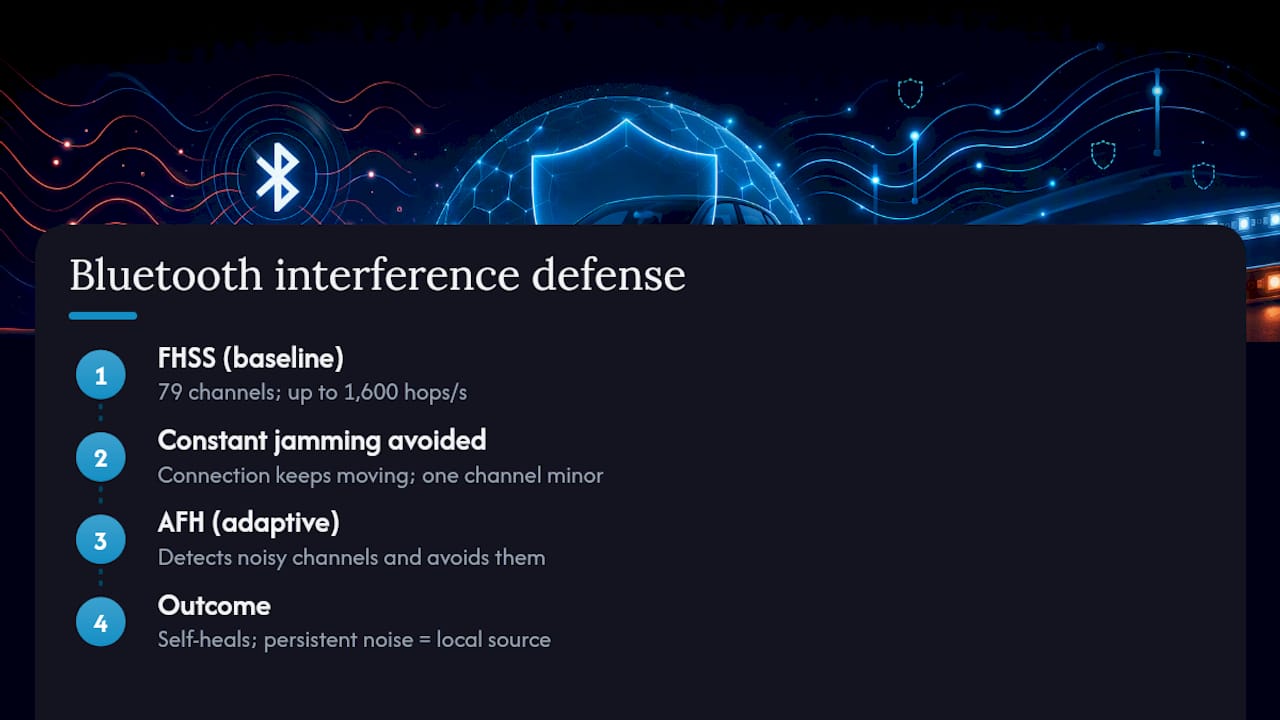
Adaptive frequency hopping, or AFH, builds on that by actively mapping which channels are noisy in real time and steering the hop pattern away from them. If your controller’s Bluetooth radio detects that a nearby Wi-Fi router is hammering a specific set of channels, AFH marks those as unusable and redistributes hops across the clean ones. This is why moving your router to a 5 GHz band, or simply walking a few feet away from a congested area, often clears up a connection almost instantly.
These technologies explain why most Bluetooth interference on LED kits is intermittent rather than constant. A controller using AFH effectively self-heals around temporary congestion, which is also why re-pairing sometimes resolves an issue that seemed serious. The re-pair forces the radio to rebuild its channel map from scratch. It’s a genuinely clever piece of engineering, and it’s also exactly why persistent, unrelenting interference points toward something FHSS and AFH can’t fix: an electrical noise source sitting right next to the controller rather than a crowded airwave.
How Should You Position Nearby Wireless Devices to Cut Interference?
Managing the devices around your Bluetooth controller matters as much as managing the controller itself. A phone mount positioned within a few feet of the controller, with a clear line of sight, gives the connection its best shot at staying stable through engine vibration and road noise.
A few adjustments make a real difference:
- Set your phone’s Wi-Fi hotspot to the 5 GHz band if it supports dual band, since that removes one major 2.4 GHz competitor from the truck cab entirely.
- Turn off Bluetooth on devices you’re not actively using, including wireless earbuds or a smartwatch sitting in a cup holder.
- Keep dash cams, which often broadcast their own Wi-Fi signal for phone syncing, powered off when you’re not actively transferring footage.
- Space out multiple Bluetooth accessories, like a stereo module and a light controller, rather than mounting them inches apart on the same dash.
None of these changes cost money, and together they clear up a surprising share of the “random disconnect” complaints installers hear. If your setup includes several powered accessories, our guide to integrating custom lighting walks through keeping wireless components from crowding each other on a single circuit.
What Else Besides Wi-Fi Causes Bluetooth Interference?
Wi-Fi gets most of the blame, but it’s far from the only 2.4 GHz tenant sharing space with your controller. Microwave ovens are a well-known offender, and while you’re unlikely to run one from a truck cab, a food truck or camp kitchen microwave nearby at an event can genuinely disrupt a Bluetooth connection for the seconds it’s running.
Older cordless phones still operating on the 2.4 GHz band are rarer than they used to be but show up at campsites and older garages. Wireless security cameras, baby monitors, and some garage door openers also compete for the same spectrum, and any of them running within range of your vehicle adds to the noise floor your controller has to work around.
At larger gatherings, the bigger culprit is usually sheer device density rather than any one appliance. Dozens of phones, hotspots, wireless speakers, and Bluetooth trackers packed into a parking lot create a noisy environment that no single fix resolves, short of physically moving to a less crowded spot or accepting occasional lag during peak hours.
Wheel Light Express’s Take on Interference-Ready Installs
We design every lighting kit here in Louisiana, and that starts with the wiring, not just the LED strip. A controller is only as reliable as the harness feeding it, which is why we build with over-spec wire gauges and heavy-duty brackets rather than cutting corners on the parts nobody sees.
Before you call any interference issue a mystery, run the basics: check your ground connections, confirm the appropriate fuse rating for the electrical load, and verify the harness routing keeps power leads away from audio cables. If you want more detail on choosing a compatible harness or app-controlled setup, our blog covers both.
— Christopher
Get a Wiring Setup Built to Avoid Interference From the Start
Wheellightexpress is the alternative to guessing your way through a bargain LED kit: we design every wheel light, rock light, and harness in Louisiana with over-spec wiring and heavy-duty 2mm brackets, so the electrical noise problems this article just walked you through are far less likely to show up in the first place.
Browse our wheel lights collection or the rock lights lineup to see kits built with reliable harnesses from the start, and check the wheel light sizing guide if you’re not sure which fitment matches your wheels. Every kit ships with our satisfaction guarantee, and financing is available if you’d rather spread the cost than pay it all upfront. Head to the wheel lights page to pick your setup and get your install started right.
Sources
- Interference in the 2.4 GHz ISM band and impact on Bluetooth performance — NIST
- How do I use PWM to control LED brightness or motor speed — Ampheo
- Fix PWM LED driver audio whine | 12V vehicle noise guide — Industrial Monitor Direct
FAQ
Do Ferrite Beads Actually Fix Bluetooth Controller Interference?
Ferrite beads reduce radiated and conducted noise when clamped near the LED driver’s power input, and looping the cable through the core multiple times increases their effect. They work well as an immediate fix but usually need pairing with proper grounding and filtering for a lasting solution.
Can a Firmware Update Fix My Controller’s Connection Problems?
Yes, firmware updates often improve how a controller handles weak signals or recovers from brief interruptions. Check both the controller’s firmware and your phone’s app for available updates before assuming a hardware issue.
Does My Phone Affect How Well the Controller Connects?
Your phone’s Bluetooth radio, its distance from the controller, and any competing apps using its wireless hardware all affect connection stability. Keeping the phone within a few feet with a clear line of sight to the controller gives you the most reliable link.
How Can I Tell if My Issue Is PWM Noise Instead of Bluetooth Interference?
If flicker or an audio whine gets worse as you increase brightness, the cause is almost certainly PWM-driven electrical noise rather than a wireless connection problem. True Bluetooth interference shows up as disconnects or lag, not symptoms tied to how bright the lights are set.
Does Wheel Light Express Sell Certified, Interference-Resistant Kits?
Wheel Light Express designs its wheel lights, rock lights, and harnesses in Louisiana using heavy-duty wiring intended to reduce the wiring-related noise covered in this guide. Current pricing and specifications for each kit are available on the product pages.